There is no single best habit tracker app. There's the one that matches how you want to work on your habits.
If you want to log any habit, on your own schedule, for as long as you like, pick a flexible tracker like Streaks, HabitKit, Habitify, Strides or Way of Life. If you want someone else to set the shape, a fixed list of tasks for a fixed number of days, pick a structured challenge app. And if a plain checklist bores you after a week, a playful app like Finch may keep you coming back.
Three kinds of habit apps
Most "best of" lists put every app in one big pile. In practice, habit apps fall into three groups.
Flexible trackers. You create habits, set a schedule, tick them off. Daily water, a weekly run, no sugar on weekdays. They run as long as you want and don't tell you what to track. Great if you already know your habits. Less great if you open the app and stare at an empty list.
Structured challenges. You join a plan with a start, an end and the same few tasks every day. Think 30 days, five tasks. Less freedom, more shape. This suits people who do well with a clear finish line and get lost when everything is optional.
Playful or gamified apps. The tracking is wrapped in something else: a pet to care for, points, rewards. The fun part is the motivation.
None of these is better. They solve different problems.
Four questions that sort the list
Answer these before you download anything. They rule out most apps in a minute.
- How many habits do you want to track? Free versions are usually capped. If you want five habits and the free tier allows three, "free" really means "trial".
- Subscription or one-time payment? Some apps charge once. Some only sell subscriptions. Some offer both, plus a lifetime option. If you search for a habit tracker with no subscription, check the in-app purchase list on the store page, not just the "Free" button.
- Which devices? Several popular trackers are Apple only. If you switch between an Android phone and a laptop, that matters more than any feature.
- Do you want freedom or a plan? This is the big one from above. Be honest about which one has actually worked for you before.
Here is how six well-known apps answer those questions, plus our own.
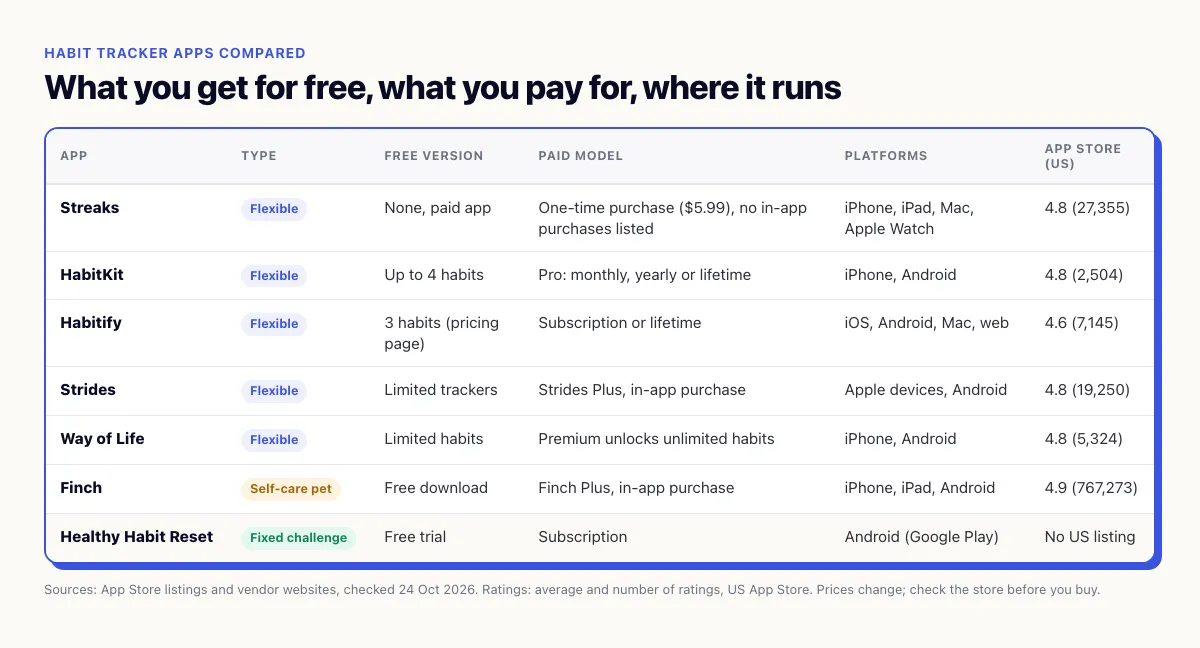
Six apps, the short version
All facts are from the App Store listings and vendor websites as of October 24, 2026. Ratings are the US App Store average on that day. Prices change, so check the store before you buy.
Streaks
Streaks is the classic pick if you don't want a subscription. It costs $5.99 on the US App Store and lists no in-app purchases. You can track up to 24 daily tasks, and on supported devices it can read Apple Health data to tick tasks off for you. It runs on iPhone, iPad, Mac and Apple Watch.
The catch: Apple only. No Android, no web. Rating: 4.8 from about 27,000 ratings.
HabitKit
HabitKit is free for up to four habits. It needs no account, keeps your habit data on your device and works offline. Each habit gets its own grid of tiles, which makes gaps very visible. Pro removes the habit limit and is sold monthly, yearly or as a lifetime purchase.
It's on iPhone and Android, according to the HabitKit website. Rating: 4.8 from about 2,500 ratings.
Habitify
Habitify is the most cross-platform of the group. Its website lists iOS, Android, Mac and a web app. The Habitify pricing page shows a free plan with 3 habits and a lifetime option next to the subscription.
Its strength is automatic logging: with your consent, the App Store listing says it can pull data from Apple Health, Google Fit, Fitbit, Strava and Screen Time. You can also mark a habit as skipped instead of missed, or pause it. Rating: 4.6 from about 7,100 ratings.
Strides
Strides goes beyond yes or no. It has four tracker types: Habit, Target, Average and Project. That makes it a good fit if your goals are numbers, like saving a sum by a date or keeping an average sleep time.
The free version is limited to a small number of trackers; Strides Plus unlocks unlimited ones. It runs on iPhone, iPad, Mac and Apple Watch, and the Strides website also points to an Android version. Rating: 4.8 from about 19,000 ratings.
Way of Life
Way of Life is about as simple as tracking gets. You mark each day green or red, keep your chains going and add a note about what went well or didn't. Premium unlocks unlimited habits. It's on iPhone and on Google Play.
If you like the idea of a visible chain, the don't break the chain method is basically what this app is built around. Rating: 4.8 from about 5,300 ratings.
Finch
Finch isn't a classic tracker. You care for a small pet by caring for yourself: quick self-care exercises, a morning mood check, an evening gratitude moment. There's a goal tracker inside, along with journaling, breathing exercises and a mood tracker. It's free to download, with Finch Plus as an in-app purchase. It runs on iPhone, iPad and Android.
Finch has by far the most ratings of the group: 4.9 from over 760,000. If plain checkboxes have never held your attention, start here.
Where Healthy Habit Reset fits, and where it doesn't
Healthy Habit Reset is our app, so take this part with that in mind. We'll keep it to what the app actually does.
It's a structured challenge app, not a flexible tracker. You pick a challenge with a fixed number of days and a short, fixed list of daily tasks. Every day you open a checklist, tick off the tasks and, if you want, take a private progress photo. Later you can put your first photo next to today's.
A few things it does on purpose:
- Streaks that don't punish you. Miss a day and the streak counter starts again, but your earlier days stay visible. More on why that matters in our piece on the streak effect.
- Friends, not followers. You add people by friend code and see their progress.
- Ready-made or your own. You can start a ready-made challenge or build one with your own tasks. The full custom builder is part of Pro.
And what it doesn't do:
- It's not an "any habit, any time" tracker. If you want to log ten unrelated habits on different schedules with no end date, Streaks, HabitKit or Habitify will serve you better.
- No real free tier. There is a free trial, then it's a subscription. Where the app is available, the current price is shown in the store. If you want something free forever, HabitKit's free plan or Way of Life are closer to that.
- Limited platforms and countries right now. As of October 24, 2026, the app is on Google Play for Android. On iPhone we only found it in the Dutch App Store, not in the US one. No web or desktop version. Check your own country's store before you plan around it.
So who is it for? People who have tried an open tracker, added twelve habits in a burst of motivation, and quietly stopped opening it. A fixed challenge removes the "what should I track?" question and gives you an end date to aim for.
Whatever you pick, start smaller than you think
The app matters less than how you use it. Most people don't fail because they chose the wrong tracker. They fail because they loaded it with too much on day one.
A few things that help, whichever app you end up with:
- Start with two or three habits. That also keeps you inside most free tiers while you find out if you like the app.
- Make each habit tiny. One page, one glass of water, two minutes of stretching. The 2-minute rule explains why this works.
- Expect a dip early. Motivation often drops after a few days. That's normal, and it's exactly when people delete the app. Here's what's going on when you quit on day 3.
- Give it two weeks before you switch. Changing apps can feel like progress. Usually it's just a reset of your streak.
If you already know what you want to track, a flexible tracker from the list above is the honest recommendation. If you'd rather have the plan handed to you, with a clear start and finish, have a look at Healthy Habit Reset. Either way, the best habit tracker app is the one you still open on day 15.