You know the pattern if you live with ADHD or just forget a lot. A new tracker, a burst of energy, then silence by day eight. A habit tracker for ADHD works when logging takes one tap, the reminder sits where you already look, and a missed day costs you nothing.
One thing up front. A habit tracker is an organisation tool. It doesn't treat ADHD, and it won't fix focus. If you have questions about diagnosis, symptoms or medication, those belong with a doctor or clinician. This piece is only about picking a tool you'll still be using in a month.
Why do so many trackers end up abandoned?
The things that make tracking hard are the same things the NHS lists as signs of ADHD in adults. On its ADHD in adults page you'll find "being easily distracted or forgetful", "finding it hard to organise your time" and "finding it hard to follow instructions or finish tasks". The CDC describes a similar picture on its signs and symptoms page: it's hard to organise or finish a task.
Now look at what a typical tracker asks of you: remember to open it, remember what you did, plan a dozen habits on day one and keep a streak going forever. Every one of those leans on exactly the skills listed above.
So it's rarely about willpower. Many trackers are quietly built for someone who already finds organising easy, who remembers to open the app, and who doesn't mind a few extra taps.
If you've had the same thing happen with every new habit, the dip after a few days is covered in why you quit on day 3.
What should an ADHD-friendly tracker do?
Five things count.
Low friction. Count the steps between finishing a habit and seeing the check mark, because each extra step is a new chance to get pulled into something else. Opening your phone to log water and resurfacing twenty minutes later in a group chat is the classic example.
One-tap logging. A tick, nothing more, with no notes, rating or mood slider unless you actually want them. Optional fields have a way of feeling mandatory.
A cue you can't miss. Out of sight really can mean out of mind. A tracker you have to remember to open is one you'll probably forget, so it should either live where your eyes already go, like the fridge door or the first page of your home screen, or come to you as a reminder at the right moment.
Kind streaks. A streak can pull you along. It can also feel like a punishment when it breaks after weeks of effort, and that moment of staring at a zero is often exactly when people give up and delete the whole app. Look for something that keeps your past days visible after a miss instead of wiping the slate. There's more on how chains help and hurt in don't break the chain.
Room for few habits. The app should be happy with two habits. If the empty screen begs you to add ten? Close it.
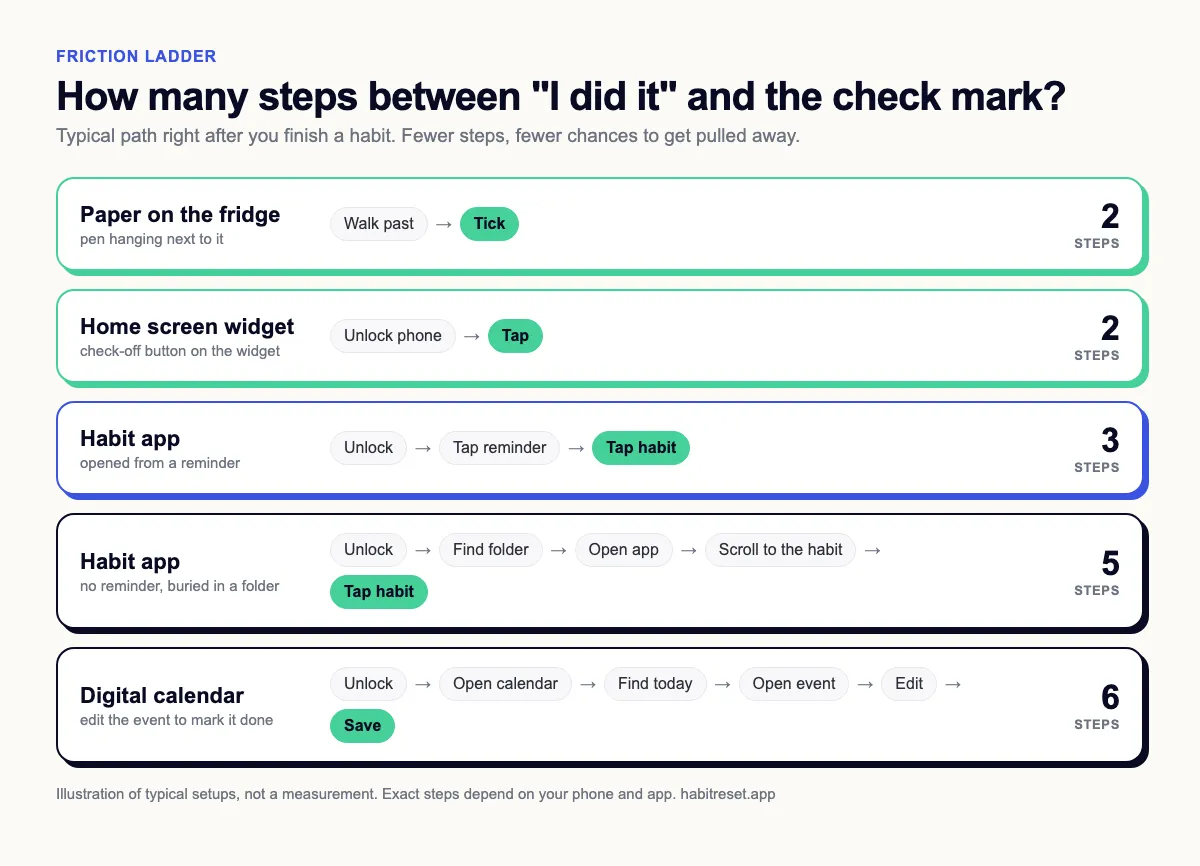
Paper, app, calendar or widget?
There's no best type. There's the one that matches where your attention already goes. Here's a rough guide to how the four common types handle the needs above.
| Tracker type | Strong at | Weak spot | Fits you if | |---|---|---|---| | Paper sheet on the fridge or bathroom mirror | Always visible, ticking takes a second, no phone to get lost in | No reminder, easy to stop seeing after a few weeks, sheet gets lost | You pass the same spot every day and your phone pulls you off track | | Habit app | Reminders, history, a streak you can see | Opening the app is a step you can forget, and your phone is full of distractions | You need a nudge from outside and a reminder you can tap to open | | Digital calendar | Already installed, reminders built in, sits next to your appointments | Marking something done is clunky, the calendar fills up and habits get lost in it | You live in your calendar anyway and want time slots more than check marks | | Home screen widget | Visible every time you unlock, often a single tap | Depends on the app supporting a widget, easy to scroll past once it's familiar | You check your phone a lot and want the habit to be the first thing there |
Mixing works. A paper sheet in the bathroom for the morning habits and an app reminder for the evening one is a perfectly good system.
Where do people usually trip up?
Too many habits at once. The first evening feels great, because you add eight habits, pick icons and set colours. Then each morning starts with a list you can't finish, and an unfinished list feels like failing, even on a day when you actually did more than you would have done without any tracker at all. Start with one or two. Add a third only once the first ones run without much thought, which often takes longer than the first excited evening suggests.
Habits that are too big. "Exercise 30 minutes" is a project. "Put on running shoes" is a habit you can log on a bad day. The 2-minute rule is built on this idea.
Reminders that turn into noise. A notification at 8:00 every morning works for a week, and then your thumb starts swiping it away on autopilot. Changing the time now and then, or tying the habit to something you already do, can help. "After I put the kettle on" is a cue that doesn't need a phone. Habit stacking explains how to build those chains.
Hunting for the perfect app. It feels like progress. Downloading, comparing and setting up are new and exciting, while ticking the same box for the twelfth day isn't. If you notice you've set up three trackers this month, pick the simplest one and stay. Still undecided? Our overview of habit tracker apps sorts the options.
Treating a missed day as the end. Gaps happen. Plan for them.
A setup that leaves room for bad days
Here's a starting setup you can adapt. Take what fits and skip the rest.
- Choose one habit you already half-do, like drinking a glass of water after waking up. Starting with something familiar makes the first check marks easy.
- Shrink it until it's almost silly: one glass, one page, one minute.
- Put the tracker where the habit happens. The sheet sits next to the glass. The widget lives on the first home screen, not page three.
- Set one reminder, at the moment the habit should happen. Not "sometime in the morning". That's too vague.
- Decide in advance what a missed day means: nothing. You tick the next one.
- After two calm weeks, ask yourself whether you want a second habit. Not before.
It might also help to tell a friend what you're tracking. Some people find a little outside attention easier than self-motivation. If that sounds like you, here's how to find an accountability partner.
Where Healthy Habit Reset fits
Healthy Habit Reset is our app, and it's a general habit app. It wasn't designed for ADHD and doesn't claim to help with it.
It might still suit some of the needs above. It's built around challenges with a short list of daily tasks, so there's no blank screen asking you to plan everything yourself. You tick tasks off day by day and the app keeps track of streaks. You can also add friends by friend code and see each other's progress.
If you want a free-form tracker for many habits, a flexible app from our comparison will serve you better. It also isn't available everywhere yet, so check your own app store first.
If a short, fixed plan sounds easier than a blank list, take a look at Healthy Habit Reset. And if you end up with a sheet of paper on the fridge instead, that's a good outcome too. The tracker that works is the one you still glance at in week three.